Transcription App for Linux
Transcription App is a desktop application for Linux that turns audio and video recordings into accurate, editable transcripts without sending a single file to the cloud. It runs OpenAI’s Whisper models and NVIDIA’s Parakeet model directly on your machine, works out who is speaking, and gives you a complete workspace to correct, subtitle and export your transcripts.
If you already run Linux, you probably did not choose it in order to hand your recordings to a web service. It runs on x86-64 and ARM machines alike, and it is an application you install and own: your projects are ordinary files in a folder you choose, the models sit on your own disk, and once they are downloaded the app transcribes with the network off.
Transcription App is free forever with Whisper Base. Transcription App is freemium: download it, transcribe complete recordings of any length in as many projects as you like, and pay nothing. A subscription unlocks the more advanced models when you need extra accuracy or speed.
Download on MacOS
Download on Windows
Download on Linux
An application, not a service
There is no account to create, no browser dashboard and no server holding your material. You install the app, work on your files, and keep them where you put them.
Transcribes with the network off
Once your models are downloaded, transcription, speaker detection and speaker recognition all run locally. The app’s only connections are a licence check and the first download of each model.
Your files, where you put them
Choose your own storage folder, on an encrypted volume or wherever your backups already point. A project is a folder of files you can copy, archive and version like anything else on the machine.
Five models, and settings you can actually reach
Every model runs on your machine. Pick the one that matches your hardware and how much you care about the last few percent of accuracy.
| Model | What it gives you | Best on |
|---|---|---|
| Whisper Large Turbo | Accuracy close to Whisper Large v3, with much faster processing | The recommended default, and the first one to try |
| Parakeet TDT 0.6B v3 | NVIDIA’s fast speech model, well suited to long recordings | Long files; set the language rather than leaving detection to the app |
| Whisper Medium | Generally more accurate than Small and Base, at some cost in speed | Machines with memory to spare |
| Whisper Small | A balanced option | Laptops with less memory |
| Whisper Base | The fastest Whisper model | Quick drafts and older hardware |
The app starts on the main processor and can use the graphics card where that is supported, falling back automatically rather than failing. If you would rather not leave it on automatic, you can set the compute device, the number of processor cores and the model precision yourself.
What you need to run it
| Distributions | Tested on Ubuntu 26.04. |
| Package | AppImage |
| Architecture | x86-64 and ARM are both supported. Transcription runs on the main processor by default |
| Graphics card | Optional |
| Memory | From 6 GB of RAM for Parakeet. Whisper models can need more, depending on the model and the settings you choose |
| Disk space | 500mb + 80mb to 2Gb depending on AI models |
| Internet | Only to check your licence and download a model the first time you use it |
Video files are transcribed from their audio track, and very large recordings are converted automatically by a media engine bundled with the app, so there is no separate dependency to install and nothing to compile.
How much memory you need
Memory matters more here than raw processor speed, because a model has to be loaded into it before a single word is transcribed. Parakeet can start at 6 GB of RAM, which makes it the practical choice on a modest laptop or a small ARM machine, and it is also the quickest of the models on long recordings. The Whisper models can ask for more, and how much depends on the settings: a larger model, a higher precision and word-level timestamps all add to the bill.
If you have less headroom than that, or you are sharing the machine with something else that wants memory, start with Whisper Base or Whisper Small and keep your test files short. Nothing breaks if you overreach. When a combination cannot load, the app falls back to one that works and keeps your queue moving instead of stopping with an error, and you can also lower the model precision or reduce the number of processor cores, each of which trades a little speed or accuracy for a smaller memory footprint.
From recording to finished transcript in five steps
Transcription App is organised around projects, so a single interview series, research study or production keeps its recordings, transcripts and notes in one place. Getting from raw audio to a clean transcript takes a few clicks.
- Create a project for a client, a study or a production.
- Add your audio or video files. Set the language, and switch on word-level timestamps and speaker segmentation if you need them.
- Queue as many files as you like. The app transcribes them one after another while you keep working on something else.
- Pick a model. Whisper Large Turbo is the recommended default, and lighter models are there for more modest machines.
- Review, correct and export. Your edits are saved automatically as you type.
You can try the editor before installing anything: the interactive demo on our home page is a live replica of the real screen, showing four models on the same recording with nothing corrected.
What the first run looks like
The first time you choose a model, the app downloads it. That is the one part of the process that needs a connection, and the one part you only do once. After that the model sits on your disk and transcription runs with the network off entirely, which is the point for anyone who runs Linux precisely so that they can decide what talks to the internet and when.
You do not have to pay to find out, or ever. Transcription App is freemium: the free mode is free forever and transcribes complete recordings of any length with Whisper Base, in as many projects as you like. A real interview tells you more than any accuracy figure on a marketing page, including ours.
A workspace, not just a transcriber
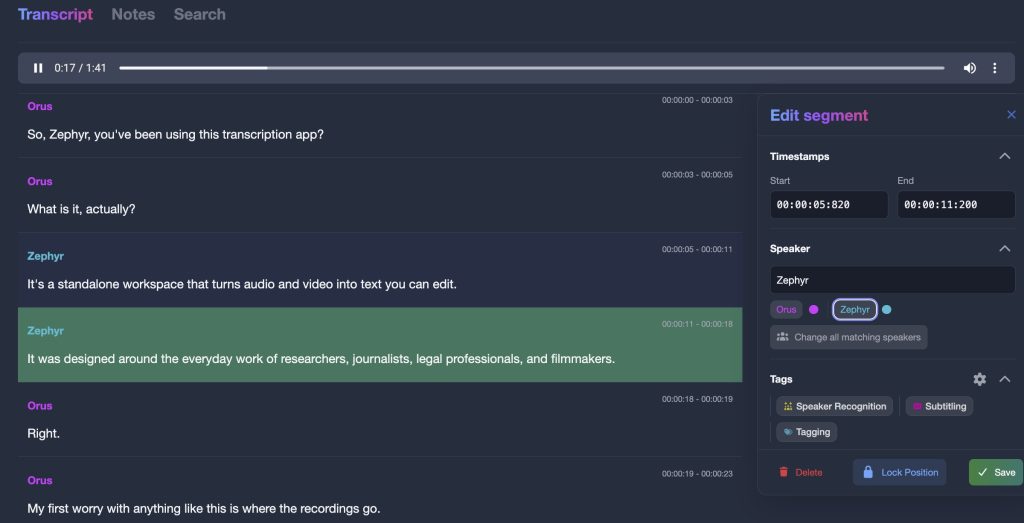
Know who said what
Pyannote speaker models, also running locally, split each recording into speaker turns. Label a few segments per voice, run Speaker Recognition, then rename “Speaker 1” once and every matching segment follows, in a colour that stays the same across the project.
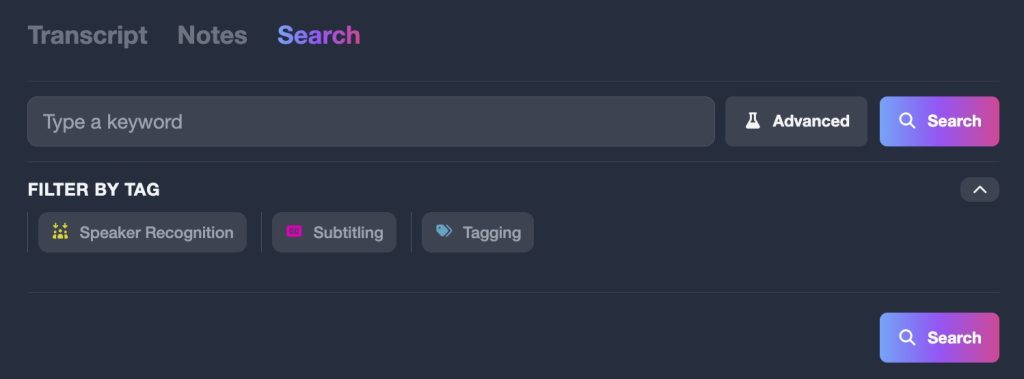
Search a whole project
Search every transcript in a project at once by keyword, narrow the results by speaker, and jump to the exact segment. Need tags for coding or advanced search with AND and OR? They are part of our sister research suite, Qualitativist.
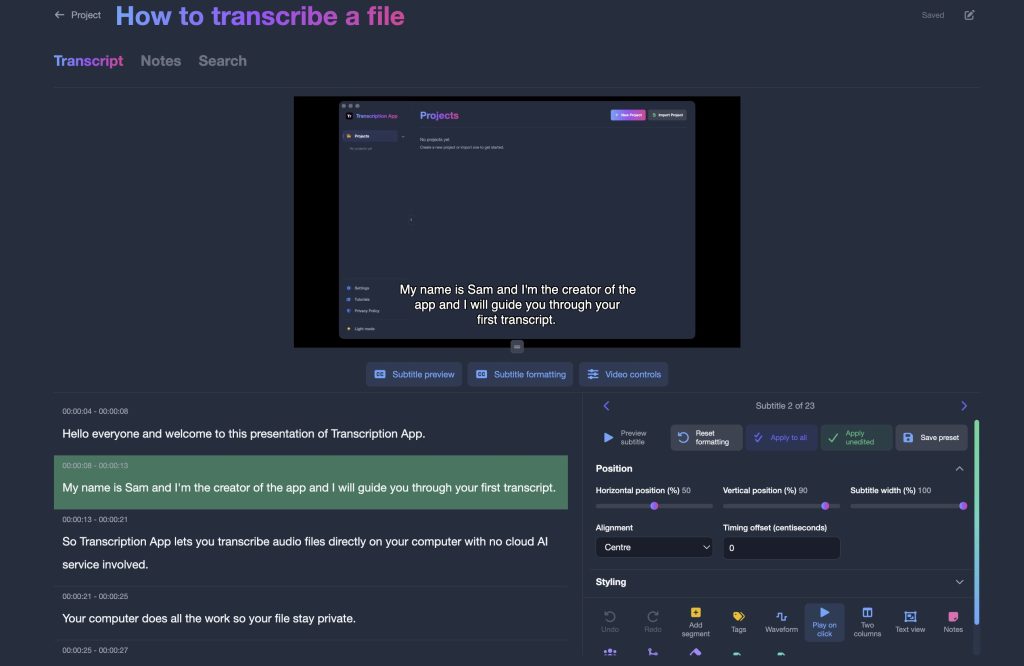
Notes, subtitles and exports
Keep project notes open beside the transcript, style subtitles directly over your video, and export as a Word document, plain text, SRT or VTT subtitles, or structured JSON. Existing transcripts and subtitles can be imported in SRT, VTT, TXT, DOC, HTML or JSON.
What the app does, and does not, do
Being clear about this matters more to Linux users than to most, so here it is plainly.
- No user accounts tied to your data
- No browser dashboards or cloud interfaces
- No uploads to third-party servers for processing
- No reuse of your content for training or analytics
- It does check a licence and download each model once
Transcription App is commercial software rather than an open-source project, so the licence is what makes those first four points enforceable rather than merely stated. Your licence is linked to the devices you verify, and you can unlink a device from the settings whenever you change machines.
Built around four kinds of work
The same Linux app serves very different jobs, and each one has its own page with the details that matter for it.
- Qualitative researchers: private transcription of interviews and focus groups, with participant data never leaving the machine. For coding, advanced search and citations, see Qualitativist.
- Journalists: fast turnarounds on interviews and press conferences, with no copy of a source’s voice on someone else’s server.
- Film and TV professionals: a subtitle editor that previews and styles cues directly on the picture, exporting to SRT and WebVTT.
- Legal professionals: depositions and hearings transcribed in-house, with privileged audio kept off third-party servers.
Why this rather than a web service
The case for cloud transcription was always that your machine could not do it. On current hardware that argument has run out, and what remains is an account you did not want, a browser tab standing in for an application, and your recordings sitting on infrastructure you cannot inspect.
| A cloud transcription service | Transcription App on your machine | |
|---|---|---|
| Where the recording goes | Uploaded to the provider’s servers | Stays on your machine, in a folder you choose |
| What you interact with | A browser dashboard tied to an account | A desktop application and ordinary files on disk |
| What you can inspect | Whatever the provider publishes about itself | The folder, the files and the network traffic, on your own terms |
| Cost | Usually charged per audio minute | Flat subscription, unlimited use |
| Long recordings | Often capped or charged extra | No cap on the length of a file |
| Working offline | Not possible | Everything except the first download of each model |
| Corrections | Re-upload, or ask for a revision | Edited in place, with the audio one click away |
None of this makes the app open source, and it is not. It is commercial software that runs locally; the difference it offers is where your data sits, not what you can read of the source.
Pricing
Start for free: Transcription App is freemium. The free mode is free forever, with no time limit and no cap on recording length, and runs on Whisper Base, so you can transcribe real work on your own machine without paying anything. Monthly and yearly subscriptions unlock the more advanced models.
Monthly
$2.29
Yearly
$22.99
Prices are also available in your local currency!
Please contact sam@transcription-app.com for discounts on multiple licenses or if you’re representing an organization.
Free forever, with Whisper Base:
- Free forever, not a trial: transcribe complete recordings of any length with Whisper Base.
- Unlimited projects, the transcription queue, speaker segmentation and recognition.
- The full transcript and subtitle editors, notes and keyword search.
- Exports to .txt, .srt and .json, transcript imports and full-storage backups.
- Your work stays yours: everything remains accessible if a subscription ends.
A subscription adds:
- The advanced AI models: Whisper Large Turbo, NVIDIA’s Parakeet v3, Whisper Medium and Whisper Small.
- Word (.doc) exports of transcripts and notes.
- WebVTT (.vtt) subtitle exports that keep your per-subtitle styling.
- Subprojects to organise larger work.
- Project archives to back up a project or send it to a colleague.
Need tags for coding, advanced search, a literature library or citations? They are part of our sister research suite, Qualitativist.
Questions about the Linux version
Which distributions are supported, and how is it packaged?
Builds are available for x86-64 and ARM machines, packaged as an AppImage. The app has been tested on Ubuntu 26.04.
Do I need a graphics card?
No. The app starts on the main processor and can use a graphics card where that is supported. If a combination does not work on your machine it falls back automatically rather than stopping your queue, and you can set the compute device yourself if you prefer.
Can I run it on a machine with no network access?
Transcription itself needs no connection once the models are on the disk. The app does connect to check your licence, and each model is downloaded the first time you select it, so the machine needs a connection at least for that initial setup.
Where does it put my files?
In a storage folder you choose, which can be an encrypted volume or any path your backups already cover. A project is a folder of ordinary files, and you can export a whole project as a single archive to move it to another machine.
Is it open source?
No. Transcription App is commercial software, with a free mode and a paid subscription. The models it runs, Whisper, Parakeet and Pyannote, are published by their respective authors and run on your machine rather than on a server.
Does my audio ever leave my machine?
No. Transcription, speaker detection and speaker recognition all run locally. Your recordings and transcripts are stored in a local folder and are never uploaded anywhere, and your content is never used for training or analytics.
Can I use one licence on more than one machine?
Your licence is linked to the devices you verify, and you can unlink a device from the settings whenever you change machines.
Which files can I transcribe?
Most common audio and video formats, including MKV. Video files are transcribed from their audio track, and very large files are converted automatically before transcription begins. You can also import existing transcripts and subtitles in SRT, VTT, TXT, DOC, HTML or JSON format.
Will it run on a low-memory laptop or an ARM machine?
ARM and x86-64 are both supported, and Parakeet can start at 6 GB of RAM, so a modest machine is workable rather than merely theoretically compatible. Below that, or alongside a lot of other running software, try Whisper Base or Whisper Small and short files first. The free mode is there to settle it on your own hardware rather than by specification.
Can I choose which processor or graphics device it uses?
Yes. The app starts on the main processor and can use a graphics card where that is supported, and if you would rather not leave it on automatic you can set the compute device, the number of processor cores and the model precision yourself. It falls back rather than failing if a combination will not load.
What happens when I rebuild or replace the machine?
Export each project as a single archive and import it on the new install, which brings the recordings, transcripts and notes across together (project archives come with a subscription). Unlink the old machine in the settings and activate your subscription on the new one.

Your recordings, your machine, your transcripts
Download Transcription App, transcribe your first recording in minutes, and keep every word under your control.
Download on MacOS
Download on Windows
Download on Linux
Also available for Mac (Apple silicon and Intel, macOS 12 Monterey or later) and Windows (x64 and ARM). New to the app? Start with our tutorials.