Transcription App for Qualitative Research
Transcription App is an AI transcription tool for qualitative researchers — Master’s and PhD students, lone researchers and whole teams — that runs entirely on your computer. Interviews, focus groups, oral histories and fieldwork recordings are transcribed by on-device Whisper and Parakeet models, so participant data never leaves the machine you are working on. There is no upload, no account holding your files, and no external processor to name on a consent form or a data management plan.
Once a transcript is ready, check it against the audio, name each participant, write memos beside the data and export clean transcripts for NVivo, ATLAS.ti or MAXQDA. Everything belonging to one study stays in a single folder you choose, recordings, transcripts and notes together, which makes backing up, archiving and handing a project over straightforward. When you want to code, search and write up in one place, our sister suite Qualitativist adds tags, advanced search, a literature library and citations on the same private transcription engine.
Transcription App is free forever with Whisper Base. Transcription App is freemium: download it, transcribe complete interviews of any length in as many projects as you like, and pay nothing. A subscription unlocks the more advanced models when you need extra accuracy or speed.
Download on MacOS
Download on Windows
Download on Linux
1. Collect
Bring interviews, focus groups, oral histories and fieldwork recordings into one project per study, instead of scattering them across folders and drives. Most common audio and video formats are accepted, and long recordings need no splitting beforehand.
2. Transcribe
Queue your recordings and let on-device AI models transcribe them in 99 languages, with every speaker identified. The app works through the queue one file after another while you read, teach or get on with the rest of the day.
3. Review
Check every line against the audio, rename each participant once, merge turns and adjust timestamps. Ready to code? Open your transcripts in Qualitativist, which adds tags that mirror your codebook.
4. Write up
Draft memos beside the data, find the quotation you need in seconds rather than scrolling through a folder of documents, and export transcripts and notes for your article, thesis or report.
Explore a real interview transcript
This is what Transcription App does
The transcription took 8 seconds on a Macbook M1 Pro with 16Gb of RAM on default settings. Speaker recognition was done at 1% threshold minimum similarity, 0% confidence margin. The result is unedited.
The player above is a live, read-only replica of the Transcription App editor. It shows an unedited conversation between two speakers, as transcribed by four of our models on the same recording. Try it the way you would read your own data:
- Filter by speaker to follow a single participant through the conversation and read their account on its own.
- Turn on Text view to read the exchange as paragraphs grouped by speaker, the layout you get when you export for analysis.
- Click any segment to hear the audio behind it, so checking a quotation against the recording takes seconds rather than minutes of scrubbing.
- Switch models with the tabs to compare accuracy and speed on the same recording, and see what a lighter model costs you in precision.
We have not corrected a single word: each transcript is exactly what the model produced, including the places where it stumbles. Your own results will vary with microphone quality, accents and how often participants talk over one another, which is why the free mode lets you test the app on your own recordings before you commit to it.
From transcripts to analysis, with Qualitativist
Transcription is only the first step of a study. Transcription App is the focused tool for that step: accurate transcripts, reliable speaker labels and memos beside the data, ready to export to NVivo, ATLAS.ti or MAXQDA. When your analysis needs more, Qualitativist takes over.
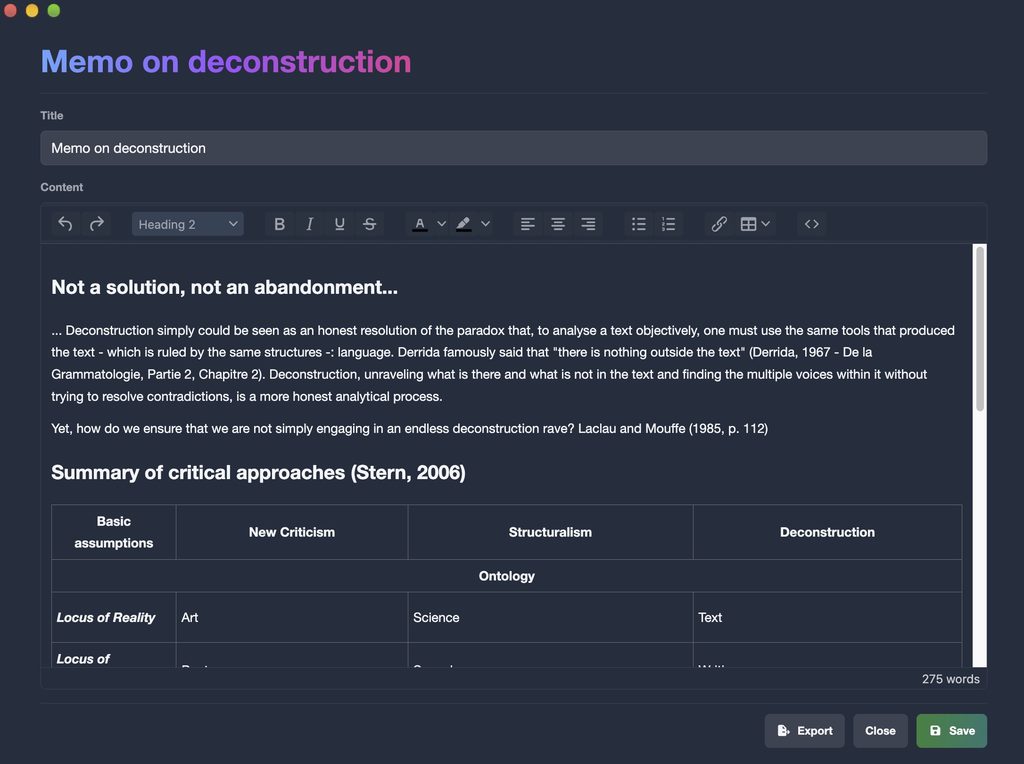
Analytic memos and keyword search
Write memos in project notes that open in their own window and stay visible next to any transcript, so theorising happens while you read rather than hours later from memory. Export notes as text files, or as Word files with a subscription. Keyword search finds a word or a phrase in one transcript or across the whole study, filtered by participant.
Code, search and cite with Qualitativist
Qualitativist is our qualitative research suite, built on the same private, on-device transcription. It adds everything that was once part of Transcription App’s research tools, and more:
- Tags for coding, colour-coded and nested to mirror your codebook
- Advanced search with AND and OR rules, to retrieve every coded passage in a study
- A literature library with citations in Word
- Research documents and web data collection from online discussions
Ready for your ethics application
Ethics committees and IRBs want to know exactly where participant data goes, who can reach it and how long it is kept. With Transcription App, the answers are short, which is usually what a reviewer is hoping to read.
| Question on your ethics or data management form | Answer with Transcription App |
|---|---|
| Where are recordings processed? | On the researcher’s own computer, by AI models installed locally. Audio is never sent anywhere to be transcribed. |
| Are data sent to a third party? | No. Recordings and transcripts are never uploaded anywhere, so there is no external processor to name. |
| Where are data stored? | In a folder the researcher chooses, such as an encrypted drive or approved institutional storage, alongside the rest of the study’s files. |
| Is a cloud platform or user account involved? | No. The app is standalone software rather than a platform, and no account holds research data. |
| Is an internet connection required? | Only to check the licence and to download a model the first time it is used. Neither carries participant recordings. |
| Are data used to train AI models? | No. Content is never reused for training or analytics, and since it never leaves the machine, there is nothing for anyone else to reuse. |
Always follow your institution’s data management plan and describe your complete workflow to your committee, including how recordings are made, where they are stored and when they will be destroyed. Transcription App simply makes the transcription step easy to justify.
Focus groups, multilingual interviews and long fieldwork days
Speaker segmentation, powered by Pyannote models on your computer, splits each recording into turns. Label a few segments per participant, ideally three or more, and Speaker Recognition does the rest, even in a lively focus group. Rename “Speaker 3” to a pseudonym once and every segment follows, and each participant keeps the same colour throughout the project, so a long group discussion can be read at a glance.
Whisper models transcribe 99 languages, so cross-cultural and multilingual studies stay in a single workspace instead of being split across tools. There is no cap on file length, and very large recordings are converted automatically before transcription begins, which means a three-hour life history interview needs no preparation on your part.
Choose Whisper Large Turbo for accuracy close to Whisper Large v3, Parakeet for speed on long recordings, or a lighter model if you are working on an older laptop in the field. Macs with Apple silicon use their graphics processor by default, and on any machine the app falls back to a setting that works rather than stopping your queue.

From transcript to NVivo, ATLAS.ti or MAXQDA
Clean transcripts you can trust
Correct the text directly, with undo and redo for your recent changes. Split and merge segments, adjust timestamps, and merge consecutive turns from the same participant into a single block. A waveform under the transcript helps you find a pause, an interruption or a passage you remember by its sound rather than its words. Switch to Text view to read the conversation as paragraphs grouped by speaker, which is exactly what you get when you export to Word or plain text.
Formats that fit your analysis
- .doc and .txt for NVivo, ATLAS.ti, MAXQDA and thesis appendices
- .json for computational and mixed-methods pipelines that need structured data rather than prose
- .srt and .vtt for timed transcripts of video data, and for captioning the extracts you show at a conference
- Imports of existing transcripts in SRT, VTT, TXT, DOC, HTML or JSON, so earlier work joins the same project
Watch a transcript come together
Create a project for your study, add your recordings, set their language, pick a model and queue the files. The app works through them one after another while you carry on with your reading, and your corrections are saved automatically as you type.
Built by a qualitative researcher
Transcription App was created by Dr Samuel Haddad-Bacry, a qualitative researcher who needed a private way to transcribe and analyse interview data and could not find one. Its features, from speaker recognition to the transcription queue, come from the realities of fieldwork and writing up rather than from a generic product roadmap. It is built for:
- PhD students with a stack of recorded fieldwork and no budget for a transcription service
- Principal investigators running multi-site studies who need every partner to handle data the same way
- Research teams who share projects as a single archive that a co-researcher imports into their own copy
- Methods teachers who want students to practise transcription on real data without cloud risk, using the free mode
No cloud. No platform. No data you cannot account for.
Pricing for researchers
Start for free: Transcription App is freemium. The free mode is free forever and transcribes complete interviews and focus groups of any length with Whisper Base, in as many projects as your study needs. When you want more accuracy or speed, a monthly or yearly subscription unlocks the advanced models.
Monthly
$2.29
Yearly
$22.99
Prices are also available in your local currency!
Please contact sam@transcription-app.com for discounts on multiple licenses or if you’re representing an organization.
Free forever, with Whisper Base:
- Free forever, not a trial: transcribe complete recordings of any length with Whisper Base.
- Unlimited projects, the transcription queue, speaker segmentation and recognition.
- The full transcript and subtitle editors, notes and keyword search.
- Exports to .txt, .srt and .json, transcript imports and full-storage backups.
- Your work stays yours: everything remains accessible if a subscription ends.
A subscription adds:
- The advanced AI models: Whisper Large Turbo, NVIDIA’s Parakeet v3, Whisper Medium and Whisper Small.
- Word (.doc) exports of transcripts and notes.
- WebVTT (.vtt) subtitle exports that keep your per-subtitle styling.
- Subprojects to organise larger work.
- Project archives to back up a project or send it to a colleague.
Need tags for coding, advanced search, a literature library or citations? They are part of our sister research suite, Qualitativist.
Questions from researchers
Will my ethics committee or IRB accept Transcription App?
Committees decide case by case, but local processing makes the transcription step easy to justify: recordings are processed on your computer, stored where you choose and never shared with a third party, so there is no data transfer to describe and no external processor to name. Describe this workflow in your application, along with how recordings are stored and when they will be destroyed, and follow your institution’s data management plan.
Can it handle focus groups with many speakers?
Yes. Speaker segmentation splits the recording into turns, and you can tune its precision for a lively group discussion rather than a quiet one-to-one. Label a few segments per participant, ideally three or more, and Speaker Recognition labels the rest. Any segment can be reassigned in one click, and renaming a participant updates every segment at once. Heavy overlapping speech is hard for any system, so expect to tidy up a few turns by hand.
Does it produce strict verbatim transcripts?
Whisper models tend to smooth out hesitations, repetitions and false starts, which suits thematic analysis but not approaches that treat the grain of talk as data, such as conversation analysis. If your analysis needs a strict verbatim convention, plan a review pass in the editor, where the audio for every line is one click away, word-level timestamps are available and the waveform shows you the pauses.
Can I import my transcripts into NVivo, ATLAS.ti or MAXQDA?
Yes. Export transcripts as Word or plain text files, which these packages import. Exporting from Text view gives you clean paragraphs grouped by speaker, the layout they handle best. If you would rather code in a private, local tool, Qualitativist adds tags and advanced search on the same transcription engine.
Which languages can I work in?
Whisper models transcribe 99 languages. Set the language for each file when you add it, or choose a default in the settings if most of your study is in one language. With Parakeet, setting the language explicitly gives the best results, as automatic detection can reduce accuracy.
Can I work in the field without an internet connection?
Yes. Once your models are downloaded, transcription works completely offline, whether you are on a train, at a field site, in a participant’s home or in a library with poor connectivity. The app connects only to check your licence and to download a model the first time you use it.
How do I share data with my supervisor or co-researchers?
With a subscription, export the project as a single archive containing its recordings, transcripts and notes, then transfer it through a channel your institution approves. Your colleague imports it into their own copy of the app and finds the study exactly as you left it. Since the archive contains the recordings themselves, check that sharing them is covered by your consent forms and ethics approval.
Do you offer licences for research teams?
Yes. Write to sam@transcription-app.com for multiple licences or institutional purchases, including invoicing through a grant or a department. Each licence is linked to the devices you verify, and a device can be unlinked from the settings when someone changes machine.
Your participants’ words, kept on your computer
Download Transcription App, transcribe your first interview in minutes, and move from fieldwork to findings without a single upload. The free mode is free forever with Whisper Base, so you can transcribe a whole study before spending anything. Need coding and citations too? Try Qualitativist.
Download on MacOS
Download on Windows
Download on Linux
Transcription App is also built for journalists, subtitling professionals and legal audio transcription. New to the app? Start with our tutorials.