Transcription App for Legal Audio Transcription
Whether you are a lawyer, a paralegal, or a legal team, Transcription App turns legal recordings into accurate, timestamped transcripts without uploading a single file. Depositions, court and tribunal hearings, client consultations, witness interviews and recorded calls are processed by AI models that run directly on your machine, so privileged audio never passes through a third-party server. There is no account holding your material, no retention policy to take on trust and no processor to add to your firm’s data map.
Instead of sending sensitive files to a legal transcription company and waiting days for the result, you handle your own legal audio transcription: a working transcript in minutes that you check line by line against the recording, with each matter kept in its own private project. When a correction is needed, you make it yourself rather than emailing a revision request and waiting for the file to come back.
Transcription App is free forever with Whisper Base. Transcription App is freemium: download it, transcribe complete recordings of any length in as many projects as you like, and pay nothing. A subscription unlocks the more advanced models when you need extra accuracy or speed.
Download on MacOS
Download on Windows
Download on Linux
Privilege stays protected
Recordings are transcribed on your device and saved in a folder you choose. Nothing is uploaded for transcription, which makes it far easier to respect attorney-client privilege, legal professional privilege and confidentiality orders. There is no provider whose staff could listen to the audio, and no third party who could be breached or asked to hand it over.
Every voice on the record
Speaker segmentation labels counsel, witnesses and the bench automatically. Label a few segments for each person and Speaker Recognition fills in the rest. Rename a speaker once and every matching segment follows, in a colour that stays the same across the matter, so even a long deposition stays easy to read.
Hours back on every matter
A long hearing can be ready for review before your next meeting, with no per-minute bill and no limit on how much you transcribe in a month.
In-house legal transcription or outsourcing?
Many firms still send their recordings to an outside legal transcription company. It works, but it means sharing privileged material with people outside the matter, paying by the audio minute and waiting for the file to come back before anyone can read a word of it. Here is how the two approaches compare for everyday working transcripts.
| Typical outsourced or cloud service | Transcription App | |
|---|---|---|
| Where your audio goes | Uploaded to the provider’s servers, sometimes in another country | Stays on your computer, in a folder you choose |
| Who can access it | The provider’s staff, partners and subcontractors | You, and the colleagues you choose to share a project with |
| Speed | Hours to days, depending on the turnaround you pay for | Minutes, depending on your hardware |
| Pricing | Usually charged per audio minute | Flat subscription, unlimited use |
| Long recordings | Often capped or charged extra | Full days in one file |
| Edits | Sent back and forth by email | Edited directly, with the audio one click away |
Transcription App produces working transcripts for case preparation, review and internal records. Where a court, tribunal or regulator requires a certified transcript, it still has to come from an approved reporter or transcription provider. You can use the app alongside them to prepare, search and check your material, and to work out which passages are worth ordering certified.
From recording to case file in five steps
Open one project per matter and every deposition, hearing and client interview for that case lives in the same place, with its own notes. A matter you come back to a year later opens exactly as you left it. Watch the app in action, then follow the steps below.
- Open a project for the matter, named after the client, the case or your file reference, so it matches the way the rest of the file is organised.
- Add your recordings. Depositions, hearings, dictations and calls, in most audio and video formats, including MKV. Set the language and switch on word-level timestamps and speaker segmentation.
- Queue the whole batch. The app transcribes each file in turn while you get on with drafting, and your corrections are saved as you type.
- Review against the audio. Click any line to hear it, correct names, case references and terms of art, and check who is speaking before a passage goes anywhere near a pleading or an attendance note.
- Export for the file. Save a Word document or plain text for your case management system, subtitles if the recording is video, or structured JSON for your litigation support tools.
Know exactly who said what, and when
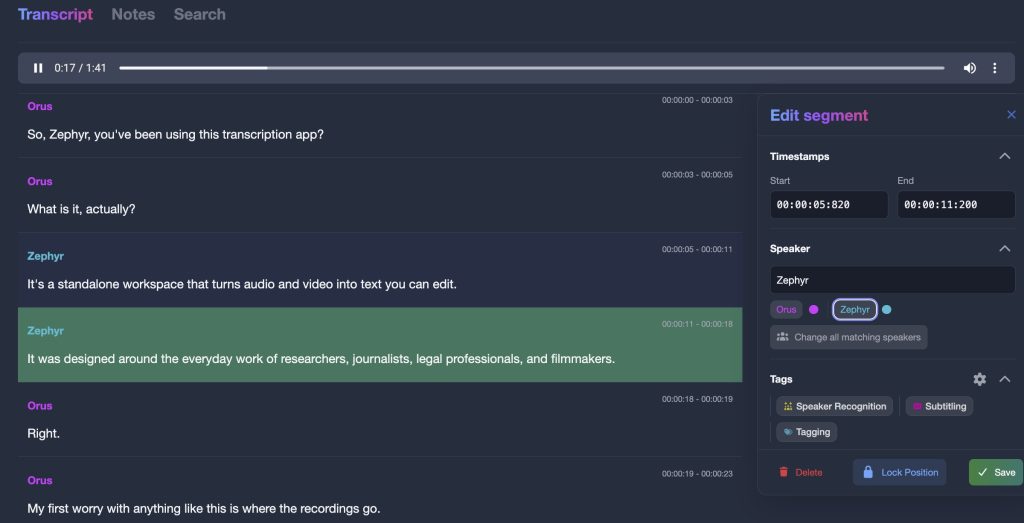
In a deposition or a multi-party hearing, attribution is everything: a line credited to the wrong person is worse than no line at all. Transcription App uses Pyannote speaker models, running on your computer, to split each recording into speaker turns.
Label a few segments for each person, ideally three or more, and Speaker Recognition fills in the rest. Rename “Speaker 1” to “Witness” or “Opposing counsel” and every matching segment updates, in a colour that stays the same across the whole matter, so you can scan a two-hour examination without reading every line. The segmentation precision can be tuned to suit a two-party interview or a crowded hearing room.
Word-level timestamps let you go back to the exact moment a statement was made, and you can split, merge and retime segments whenever the record needs tidying. Every change can be undone, and the audio behind any line is always one click away, so nothing in the transcript has to be taken on trust.
Find the testimony that matters
A legal verbatim transcription is only useful if you can find what you need in it, months after the recording was made. Search and annotate every recording in a matter without leaving the app.
Case notes and search beside the transcript
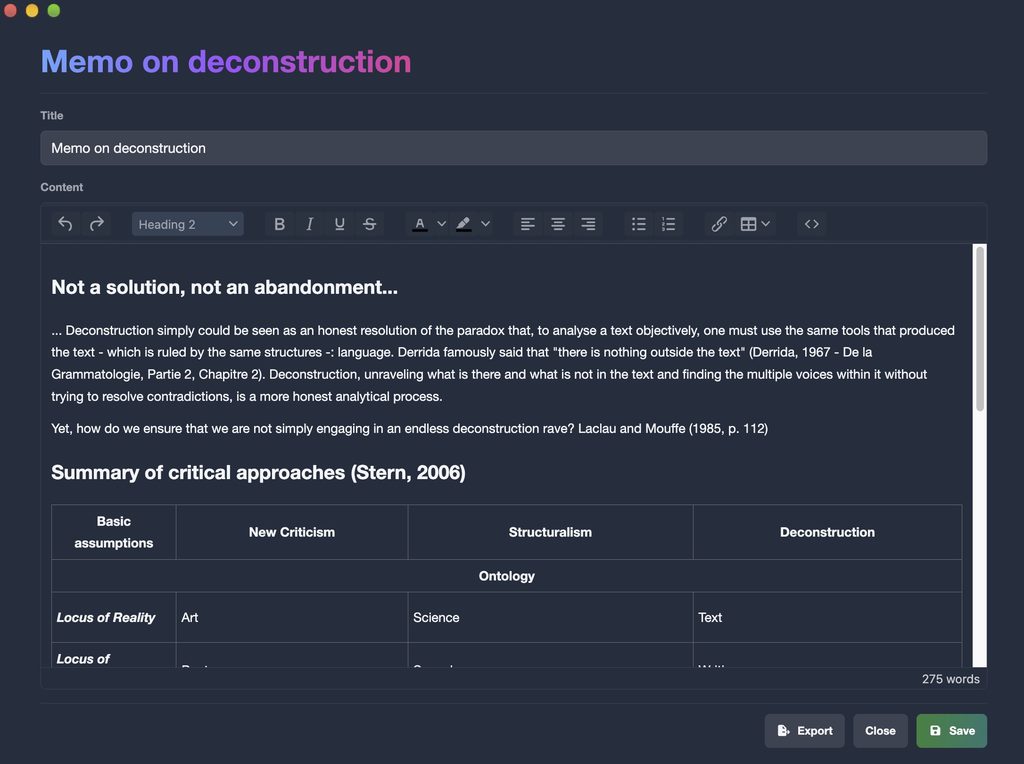
Keep matter notes open in their own window while you review, so your thinking is captured next to the passage that prompted it, then export them as text, or as Word files with a subscription. Keyword search finds a name, a date or a phrase in one transcript or across every recording in the matter, filtered by speaker, and jumps straight to the segment with its audio ready to play.
Need to tag admissions and exhibits, or combine search conditions with AND and OR? Those tools are part of our sister suite, Qualitativist, built on the same private, on-device transcription.
Confidential by design, not by promise
Most online transcription services ask you to trust their storage and retention policies. Transcription App removes the question altogether: there is nothing to upload and no platform to trust. The answer to “where is the audio?” is the same as it was before you started: on your machine.
- Transcription, speaker detection and speaker recognition run entirely on your computer
- No user account holds your recordings or transcripts
- Projects are saved in any folder you choose, including encrypted drives and firm-managed storage
- Once your models are downloaded, you can work offline at the office, in court or on the move
- Your content is never used for training or analytics
The app only goes online to check your licence and download a model the first time you use it, and none of those requests carry your audio. That makes it much easier to meet your duty of confidentiality and your firm’s data-security policies, though, as with any tool, you should check it against your own professional obligations and any undertakings given in the matter.

Cross-border matters in 99 languages
Whisper models transcribe 99 languages, so interviews with foreign-language witnesses and recordings from international arbitration sit in the same workspace as the rest of the case, instead of going out to a separate provider under a separate agreement. Set the language for each file as you add it, or choose a default in the settings.
Pick the model that suits your computer: Whisper Large Turbo for accuracy close to Whisper Large v3 in a fraction of the time, NVIDIA’s Parakeet for long recordings, or lighter Whisper models for older laptops. Transcription App runs on macOS, Windows and Linux, uses the graphics processor where one is available, and falls back automatically to a setting that works rather than stopping your queue.
Pricing for legal professionals
Start for free: Transcription App is freemium. The free mode is free forever and transcribes complete depositions and hearings of any length with Whisper Base. Subscriptions are flat-rate, with no per-minute fees however many hours you record, and unlock the more advanced models, which makes the cost of a transcript predictable whether a matter runs to two recordings or two hundred.
Monthly
$2.29
Yearly
$22.99
Prices are also available in your local currency!
Please contact sam@transcription-app.com for discounts on multiple licenses or if you’re representing an organization.
Free forever, with Whisper Base:
- Free forever, not a trial: transcribe complete recordings of any length with Whisper Base.
- Unlimited projects, the transcription queue, speaker segmentation and recognition.
- The full transcript and subtitle editors, notes and keyword search.
- Exports to .txt, .srt and .json, transcript imports and full-storage backups.
- Your work stays yours: everything remains accessible if a subscription ends.
A subscription adds:
- The advanced AI models: Whisper Large Turbo, NVIDIA’s Parakeet v3, Whisper Medium and Whisper Small.
- Word (.doc) exports of transcripts and notes.
- WebVTT (.vtt) subtitle exports that keep your per-subtitle styling.
- Subprojects to organise larger work.
- Project archives to back up a project or send it to a colleague.
Need tags for coding, advanced search, a literature library or citations? They are part of our sister research suite, Qualitativist.
Legal transcription questions
Is Transcription App suitable for privileged or confidential recordings?
Transcription runs entirely on your computer and nothing is uploaded anywhere, which removes the main confidentiality risk of cloud transcription: there is no third party holding a copy and no retention policy to rely on. You decide where projects are stored, including on encrypted drives and firm-managed storage. We still recommend checking the app against your firm’s policies, your professional rules and any undertakings given in the matter.
Can I use the transcripts as official court transcripts?
Transcription App produces accurate working transcripts for case preparation, review and internal records. Where a court or tribunal requires a certified transcript, it has to come from an approved reporter or transcription provider, and nothing the app produces changes that. Many teams use it to prepare, search and check their material in the meantime, and to identify the passages that are worth ordering certified.
How accurate is legal audio transcription with Transcription App?
Accuracy depends on the recording quality, the language, the number of voices and the model you choose. Whisper Large Turbo handles most legal vocabulary well, and case names, party names or unusual terms of art are quick to correct in the editor, with the audio one click away. Treat any machine transcript as a first draft and check a passage against the recording before you rely on it. The free mode, free forever with Whisper Base, lets you test complete recordings of your own.
Can it transcribe long depositions and full-day hearings?
Yes. There is no cap on the length of a file, so a full day in a single recording is no problem. Very large audio and video files are converted automatically by a media engine bundled with the app, so there is nothing else to install, and you can queue several recordings to run one after another over a lunch break or overnight.
Which files can I work with?
Most common audio and video formats, including MKV, with video transcribed from its audio track. You can also import existing transcripts in SRT, VTT, TXT, DOC, HTML or JSON format, so material from an earlier provider or an older matter can be searched alongside new recordings.
Does it work without an internet connection?
Yes, once your models are downloaded. The app only connects to check your licence and download a model the first time you use it, so a laptop taken into a hearing, or one deliberately kept off the network, works exactly as it does at your desk.
Can I share a matter with a colleague or co-counsel?
With a subscription, export the project as a single archive containing its recordings, transcripts and notes, and send it through your firm’s usual secure channel. Your colleague imports it into their own copy of the app and sees the matter as you left it. Since the archive holds the recordings themselves, treat it with the same care as the underlying material.
Do you offer licences for law firms?
Yes. Write to sam@transcription-app.com if you need several licences or are buying on behalf of a firm, chambers or legal department, including where you need an invoice. Each licence is linked to the devices you verify, and a device can be unlinked from the settings when someone changes machine.
Keep privileged audio where it belongs
Download Transcription App, transcribe your first deposition or client interview in minutes, and keep every word of the record under your control. The free mode is free forever with Whisper Base, so you can judge the quality on real matters before spending anything.
Download on MacOS
Download on Windows
Download on Linux
Transcription App is also built for journalists, qualitative researchers and subtitling professionals. New to the app? Start with our tutorials.