Transcription App for Journalists
Transcription App is AI transcription for reporters, editors, producers and whole newsrooms, and it runs entirely on your own computer. Interviews, press conferences, phone and video calls, doorsteps and field recordings are transcribed locally in 99 languages, with speaker diarisation that tells you who said what. It is a place to work as well as a transcriber: correct the text against the audio, name each voice, search a whole investigation by keyword, and export clean copy for your editor or subtitles for a video piece.
No upload means no copy of your source’s voice on someone else’s server, and no third party that could be breached, pressured or asked to hand it over. There is no account holding your material and no retention policy to take on trust. Your recordings, transcripts and notes stay in a folder you choose, on the machine you already trust with your reporting.
Transcription App is free forever with Whisper Base. Transcription App is freemium: download it, transcribe complete interviews of any length in as many projects as you like, and pay nothing. A subscription unlocks the more advanced models when you need extra accuracy or speed.
Download on MacOS
Download on Windows
Download on Linux
Source protection starts with where you transcribe
Most online transcription services process your audio on their own servers. Every upload creates a copy you cannot see, on infrastructure you cannot inspect, often in a country you did not choose. For a whistleblower interview, an off-the-record briefing or any conversation that could identify someone at risk, that is one copy too many. Before you send a recording anywhere, it is worth asking:
- Who at the provider can listen to the audio, and who can read the transcript once it has been processed?
- How long are the files really kept, in which country, and what happens to the backups after you delete them?
- Could your recording be used to train someone else’s AI model, now or after a quiet change of terms?
- Who would tell you, and how quickly, if the service were breached or handed a legal demand for your files?
With Transcription App, the answer is simple: the files never leave your computer. Transcription, speaker detection and speaker recognition all run on your device, there is no user account holding your material, and your content is never used for training or analytics. The app goes online only to check your licence and to download a model the first time you use it. Neither connection carries your audio, and once your models are on the machine you can work with no connection at all.
Check every quote against the tape
The player below is a live, read-only replica of the Transcription App editor. It shows the same interview transcribed by four of our models, exactly as they produced it: we have not corrected a single word. Use it the way you would check a quote before filing, and judge the accuracy for yourself rather than taking our word for it.
This is what Transcription App does
The transcription took 8 seconds on a Macbook M1 Pro with 16Gb of RAM on default settings. Speaker recognition was done at 1% threshold minimum similarity, 0% confidence margin. The result is unedited.
- Click a segment to play the recording from that exact moment and hear the words behind the text.
- Right-click a segment, or Ctrl/Cmd-click it, to see its timestamps and speaker, so you can cite the minute as well as the words.
- Filter by speaker to pull out everything one interviewee said and set the rest of the room aside.
- Turn on Text view to read the conversation as clean paragraphs grouped by speaker, ready to quote.
- Switch models with the tabs to compare speed and accuracy on the same recording, including the difference a lighter model makes on a modest laptop.
Transcripts on deadline
Queue the morning’s interviews and the app works through them one after another while you start writing, saving your corrections as you type. Five models let you trade a little accuracy for speed when the deadline is closer than the perfect transcript.
The quote in seconds
Search every interview in a story at once by keyword, and narrow the results by speaker. A single click takes you to the segment, with the audio ready to play.
Sources in 99 languages
Whisper models transcribe 99 languages, so foreign correspondents, fixers and international desks can work in the language of the interview. Set the language for each file as you add it, or choose a default in the settings, and keep a foreign-language interview and your English notes side by side in one project.
From recorder to copy
Organise your reporting in projects, one per story, investigation or beat. Each project keeps its recordings, transcripts and notes together, so a story you come back to in six months opens exactly as you left it. Watch the app in action, then follow the five steps below.
- Create a project for the story, the investigation or the beat you are covering, and keep everything that belongs to it in one place.
- Add your recordings: interviews, phone and video calls, press conferences and video clips, in most common audio and video formats, including MKV. Video is transcribed from its audio track, and very large files are converted automatically before transcription begins.
- Set the language for each file, and switch on speaker segmentation and word-level timestamps when you will need to show exactly who said what, and when.
- Queue and transcribe as many files as you like while you keep working on something else. Whisper Large Turbo is our recommended default, with lighter models for an older laptop. Your corrections are saved as you type.
- Pull your quotes and export a Word document or plain text for your editor, SRT or WebVTT subtitles for a video piece, or structured JSON if your desk works with the data.
Tools for long investigations
Big stories are built from dozens of interviews and half-remembered remarks, gathered over weeks or months. Transcription App keeps them searchable and organised from the first tip to the final legal read, without moving anything off your laptop.
Notes and search in the same place
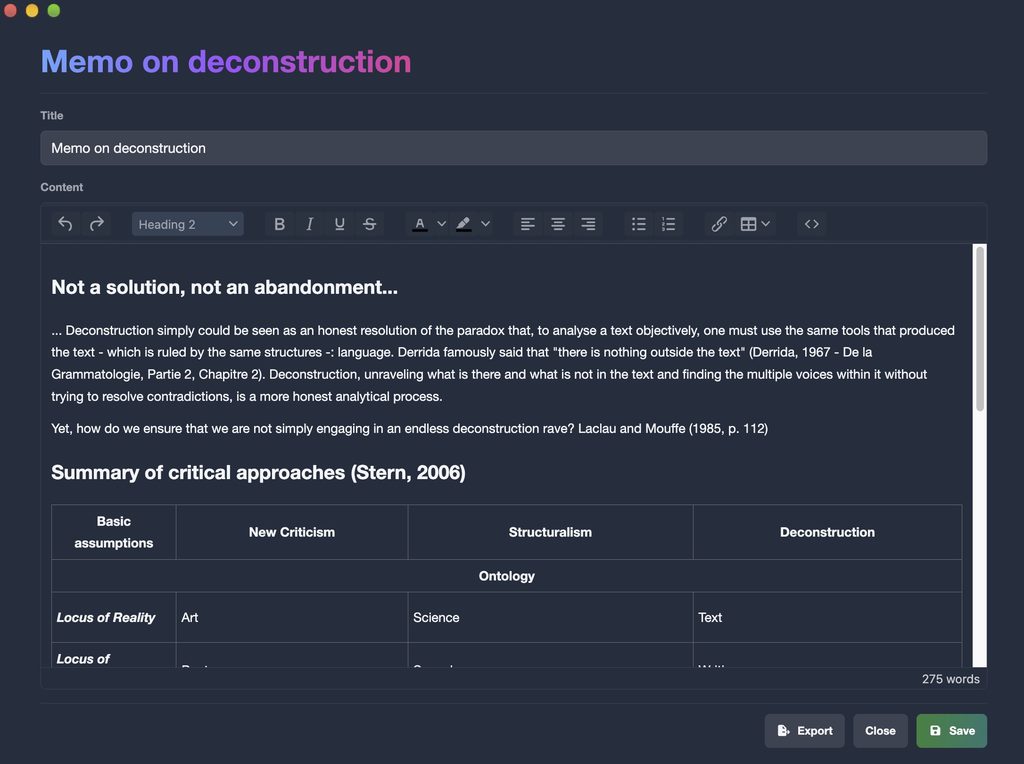
Keep your reporting notes open in their own window beside a transcript, so a running memo grows while you listen, and export them as text, or as Word files with a subscription. Keyword search finds a name or a phrase across every interview in the project, filtered by speaker.
Need to tag passages, run advanced searches with AND and OR, or collect public comment threads from the web? Those tools live in our sister suite, Qualitativist, which runs on the same private, on-device transcription.
Know who said what, in any interview
Speaker diarisation, powered by Pyannote models that run on your computer, splits every recording into speaker turns. Label a few segments per voice, ideally three or more, then run Speaker Recognition and the app labels the rest, from a one-to-one interview to a noisy panel or a scrum outside a courtroom. You can tune the segmentation precision to suit the recording.
Rename “Speaker 1” to your interviewee once and every matching segment follows. Each voice keeps its colour across the project, so you can scan a two-hour conversation at a glance, and consecutive turns from the same person can be merged into a single block. Keyword search, filtered by speaker, retrieves any quote within one transcript or across a whole project.
Out in the field? Once your models are downloaded, transcription works offline: on a train, in a hotel room with unreliable wifi, in a car outside a council meeting or anywhere with no network at all. Nothing sits waiting in a queue in someone else’s data centre.
Pricing for journalists
Start for free: Transcription App is freemium. The free mode is free forever and transcribes complete interviews of any length with Whisper Base, so you can file real stories without paying anything. When you want more accuracy or speed, a monthly or yearly subscription unlocks the advanced models.
Monthly
$2.29
Yearly
$22.99
Prices are also available in your local currency!
Please contact sam@transcription-app.com for discounts on multiple licenses or if you’re representing an organization.
Free forever, with Whisper Base:
- Free forever, not a trial: transcribe complete recordings of any length with Whisper Base.
- Unlimited projects, the transcription queue, speaker segmentation and recognition.
- The full transcript and subtitle editors, notes and keyword search.
- Exports to .txt, .srt and .json, transcript imports and full-storage backups.
- Your work stays yours: everything remains accessible if a subscription ends.
A subscription adds:
- The advanced AI models: Whisper Large Turbo, NVIDIA’s Parakeet v3, Whisper Medium and Whisper Small.
- Word (.doc) exports of transcripts and notes.
- WebVTT (.vtt) subtitle exports that keep your per-subtitle styling.
- Subprojects to organise larger work.
- Project archives to back up a project or send it to a colleague.
Need tags for coding, advanced search, a literature library or citations? They are part of our sister research suite, Qualitativist.
Questions from journalists
Does my audio ever leave my computer?
No. Transcription, speaker detection and speaker recognition all run on your device, using models stored on your own disk. Recordings and transcripts are kept in a folder you choose and are never uploaded anywhere. The app connects only to check your licence and to download a model the first time you use it, and neither request carries your audio.
Can I transcribe phone and video call recordings?
Yes, as long as the recording is saved in a common audio or video format, including MKV. Video files are transcribed from their audio track, and very large files are converted automatically by a media engine bundled with the app, so there is nothing else to install. Recording rules vary from one country to another and from one situation to another, so make sure you have the right to record under the rules that apply to you.
How accurate are the quotes?
Accuracy depends on the recording quality, the language, the number of voices and the model you choose, and Whisper Large Turbo is our recommended default. The demo above shows unedited output from four models on the same file, so you can see the difference for yourself. Treat any machine transcript as a first draft: always check a quote against the audio before publishing, which takes a second, since clicking a segment plays the recording from that exact moment.
Which languages are supported?
Whisper models transcribe 99 languages. Set the language for each file when you add it, or choose a default in the settings so you do not have to pick it every time. Parakeet is very fast on long recordings, but set its language explicitly, as automatic detection can reduce accuracy.
Does it work offline in the field?
Yes, once your models are downloaded. The app only connects to check your licence and download a model the first time you use it. Everything else, transcription and speaker recognition included, happens on your machine, so a train, a hotel with bad wifi or an assignment with no network at all makes no difference to your work.
Can I share a transcript with my editor?
Export it as a Word document or plain text: export from Text view and you get clean paragraphs grouped by speaker, ready to drop into copy. With a subscription, you can also export the whole project as a single archive containing its recordings, transcripts, notes and subtitle presets, which a colleague imports into their own copy of the app. Since that archive holds the material itself, send it through your newsroom’s secure channels.
Can I use it for video journalism and podcasts?
Yes. Video files are transcribed from their audio track, and subtitle editor mode turns every segment into a subtitle you can preview on the picture and style cue by cue: position, width, font, size, line spacing, colours, outline, shadow and characters per line. Export to SRT for maximum compatibility, or to WebVTT with per-subtitle positioning and styling. See Transcription App for subtitles.
Do you offer newsroom licences?
Yes. Write to sam@transcription-app.com for multiple licences, or if you are buying on behalf of a publication, a desk or a group of freelancers and need an invoice. Each licence is linked to the devices you verify, and a device can be unlinked from the settings whenever someone changes machine.

Protect your sources, keep your deadlines
Download Transcription App, transcribe your next interview in minutes, and keep every recording on the machine you trust. The free mode is free forever with Whisper Base, so you can judge the quality on real work before you spend anything.
Download on MacOS
Download on Windows
Download on Linux
Transcription App is also built for qualitative researchers, subtitling professionals and legal audio transcription. New to the app? Start with our tutorials.