Transcription App for Subtitles
Transcription App works for subtitlers, video editors and other Film and TV professionals. Its transcription functionalities generate accurate subtitles locally from your video and audio files. On-device Whisper and Parakeet models turn dialogue into timed cues in 99 languages, then a built-in subtitle editor lets you preview, style and retime every line directly on the picture.
Because nothing is uploaded anywhere, unreleased films, pre-broadcast episodes and client footage under NDA stay on your workstation, from the first cue to the final SRT or WebVTT file. There is no user account holding your media, no cloud dashboard to account for, and nothing to delete from someone else’s servers once the job is signed off.
Transcription App is free forever with Whisper Base. Transcription App is freemium: download it, subtitle complete films and episodes of any length in as many projects as you like, and pay nothing. A subscription unlocks the more advanced models when you need extra accuracy or speed.
Download on MacOS
Download on Windows
Download on Linux
A subtitle editor on top of your video
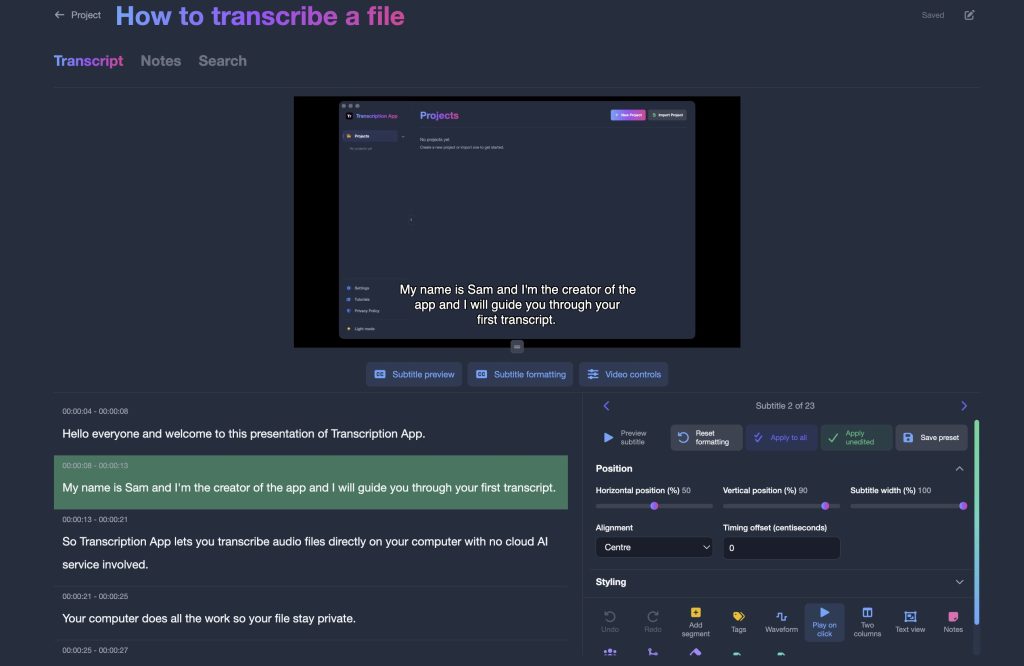
Turn on subtitle editor mode and every transcript segment becomes a subtitle you can see on your footage, in the player or in full screen, exactly as viewers will. You are never styling in the abstract and hoping it reads: each cue sits over the shot it belongs to, so a line that collides with a lower third, a pale sky or a busy frame is obvious while there is still time to move it.
Placement and timing
- Position and width of each subtitle, so a cue can move clear of a lower third or a burnt-in title
- Alignment and characters per line, to keep every line within your reading limits
- Timing offset, plus split, merge and retime for a line that runs long or lands early
- Keyboard stepping from cue to cue, with a shortcut you choose yourself
Typography and colour
- Font, text size and line spacing
- Text and background colours, including a solid box behind the text when the picture is pale
- Outline and shadow for legibility on any shot
- Presets you can apply to one cue, to every cue you have not styled yet, or to the whole project
Every change can be undone, and splitting a subtitle keeps its formatting, so you can try a look on a difficult scene without committing to it.
Straight from the video file
Drop in common video formats, including MKV. The audio track is used for transcription, and very large rushes are converted automatically by a media engine bundled with the app, so there is nothing else to install, no proxy to make and no audio to strip out first.
Subtitles in 99 languages
Whisper models transcribe 99 languages, so foreign-language productions, festival submissions and multilingual interviews all go through the same workflow. Set the language for each file as you add it, or pick a default in the settings for a series that stays in one language.
Embargo-safe by design
Footage never leaves your workstation, which makes it far easier to respect NDAs, broadcaster embargoes and studio confidentiality requirements. There is no third-party processor to declare on a security questionnaire, and no copy of the cut sitting on a server you do not control.
From rushes to subtitle file
Organise your work in projects, one per film, series or client, and keep every episode, its subtitles and its style presets together. A series you come back to in six months opens with the look you defined the first time, so episode nine matches episode one without any guesswork. Watch the app in action, then follow the workflow below.
- Create a project for the production and add your video files, one reel at a time or a whole batch of episodes at once.
- Set the language and switch on word-level timestamps for tighter cue timing, along with speaker segmentation when a scene has several voices.
- Transcribe with Whisper Large Turbo, or with Parakeet for long episodes, while you get on with other work. The queue runs file after file, and your corrections are saved as you type.
- Switch on subtitle editor mode to split, merge and retime cues on the picture, and to fix the words the model misheard while you watch the shot they belong to.
- Style and export to WebVTT with per-subtitle positioning and styling, or to SRT for maximum compatibility, with a .doc, .txt or .json transcript as well if the production needs a dialogue list.
SRT or WebVTT? Export both
Choose the format that suits each delivery. Both keep your text and timings, and WebVTT also carries the look you designed, which is worth deciding on early: there is no point styling every cue by hand if the file is going to a platform that ignores it.
| SRT export | WebVTT export | |
|---|---|---|
| Text and timings | Yes | Yes |
| Cue position | Not included | Yes, subtitle by subtitle |
| Font, colour, outline, shadow | Not included | Yes, subtitle by subtitle |
| Support | Nearly all players, suites and subtitle tools | Web players and modern platforms; how much styling survives depends on the player |
| Best for | Editors, subtitle software, broadcasters and most delivery specs | Web video, e-learning and styled online releases |
External players differ in how much WebVTT styling they display, so preview on your target platform before delivery, and fall back to SRT whenever a spec is strict or unknown. SRT export is included in the free mode; WebVTT export comes with a subscription. You can also export the transcript as .doc, .txt or .json for dialogue lists, scripts and archives.
Know which character is speaking
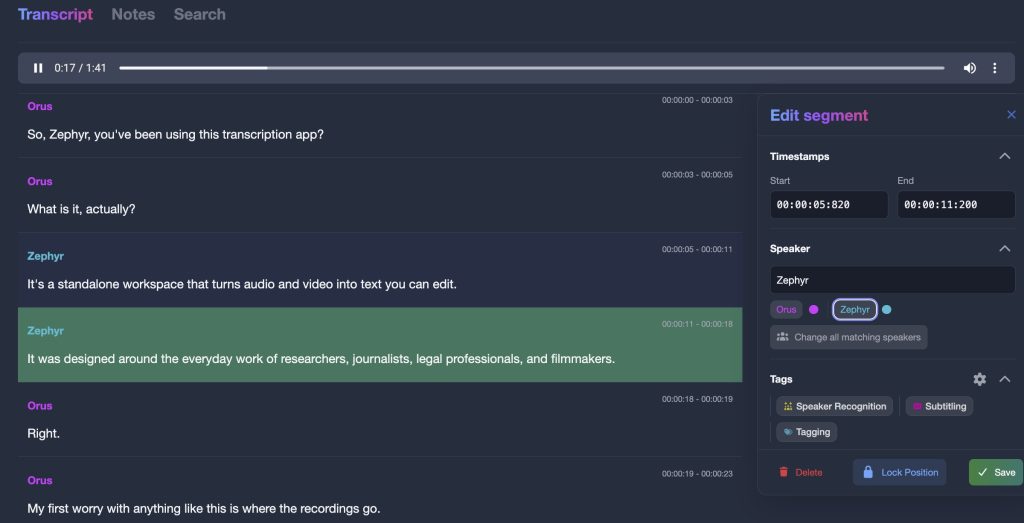
Pyannote speaker models, running on your computer, split dialogue into speaker turns. Label a few lines for each character, ideally three or more, and Speaker Recognition labels the rest, whether you are working on a two-hander or a documentary with a dozen contributors. You can tune the segmentation precision to suit the scene.
Rename “Speaker 2” to a character’s name once and every matching cue follows. Each speaker keeps its own colour throughout the project, so long dialogue scenes and documentary interviews are quick to scan and check, and a line attributed to the wrong voice is easy to spot well before it reaches the deliverable.
Fits the subtitling tools you already use
Bring existing subtitles in
Import SRT and VTT files, as well as TXT, DOC, HTML or JSON transcripts, to restyle, retime or search subtitles you already have. A file that arrived from a client, a previous vendor or an old archive becomes editable in the same workspace as the material you transcribed yourself.
Send finished files anywhere
SRT files open in Subtitle Edit, Aegisub, EZTitles and virtually every editing suite, so you can generate the first pass locally and finish in whichever tool your client specifies. Nothing about the workflow locks you in: what you produce are ordinary subtitle files, in a folder you chose.
Find any line across a series
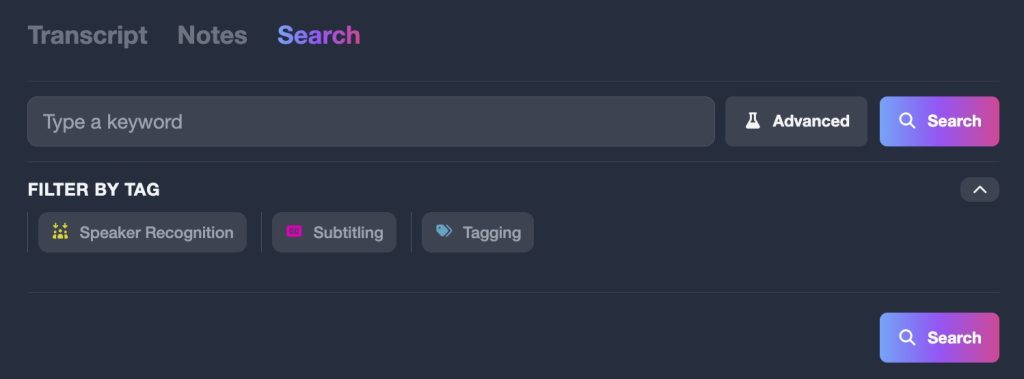
Search every transcript in a project at once to find a line of dialogue, a name or a recurring phrase across episodes. Search by keyword, filter by speaker, then jump straight to the cue with your terms highlighted and the audio ready to play. Invaluable when a note arrives late and a name or a term has to be corrected everywhere it appears.
Your client’s footage stays in the edit suite
Unreleased films and pre-broadcast episodes are among the most sensitive files in any production, and most transcription services begin by asking you to upload them. Transcription App processes them where they already are.
- Transcription and speaker recognition run on your computer, using models stored on your own disk
- No uploads, no user account holding your media, no cloud dashboard
- Projects are saved in the folder you choose, including project drives and encrypted disks
- Works offline once your models are downloaded, even in an edit suite with no network
- Your content is never used for training or analytics
Transcription App runs on macOS (Apple silicon and Intel), Windows and Linux. On Apple silicon it uses the graphics processor by default, and on other machines it can use a supported graphics card, falling back automatically to a setting that works rather than stopping your queue. Advanced users can pick the compute device, the number of processor cores and the model precision, and everyone else can leave those on automatic.
Pricing for subtitling work
Start for free: Transcription App is freemium. The free mode is free forever: generate, style and export SRT subtitles for complete films and episodes of any length with Whisper Base. When you want more accuracy or speed, or styled WebVTT exports, a monthly or yearly subscription unlocks the advanced models.
Monthly
$2.29
Yearly
$22.99
Prices are also available in your local currency!
Please contact sam@transcription-app.com for discounts on multiple licenses or if you’re representing an organization.
Free forever, with Whisper Base:
- Free forever, not a trial: transcribe complete recordings of any length with Whisper Base.
- Unlimited projects, the transcription queue, speaker segmentation and recognition.
- The full transcript and subtitle editors, notes and keyword search.
- Exports to .txt, .srt and .json, transcript imports and full-storage backups.
- Your work stays yours: everything remains accessible if a subscription ends.
A subscription adds:
- The advanced AI models: Whisper Large Turbo, NVIDIA’s Parakeet v3, Whisper Medium and Whisper Small.
- Word (.doc) exports of transcripts and notes.
- WebVTT (.vtt) subtitle exports that keep your per-subtitle styling.
- Subprojects to organise larger work.
- Project archives to back up a project or send it to a colleague.
Need tags for coding, advanced search, a literature library or citations? They are part of our sister research suite, Qualitativist.
Subtitling questions
Which video formats can I subtitle?
Most common audio and video formats, including MKV. Video files are transcribed from their audio track, and very large files are converted automatically before transcription begins, so there is nothing else to install and no need to prepare a proxy or export the audio yourself.
Which subtitle formats can I export?
SRT for maximum compatibility, free, and WebVTT with per-subtitle positioning and styling, with a subscription. You can also export the transcript as .doc, .txt or .json when a production needs a dialogue list, a script or structured data rather than a subtitle file.
Will my styling appear in every video player?
The in-app preview shows your subtitles exactly as designed, but external players differ in how much WebVTT styling they display, and some ignore positioning altogether. Check your target platform before delivery, or export SRT when compatibility matters most and let the player apply its own defaults.
Can I edit subtitles I already have?
Yes. Import SRT or VTT files, then retime, split, merge and restyle them before exporting again. Every change can be undone, and splitting a cue keeps its formatting, so an inherited file can be brought up to your house style without starting over.
How precise are the timings?
Cue timings come from the transcription model, and switching on word-level timestamps gives you finer control. You can adjust any start or end time in the editor, apply a timing offset to a cue, and step through cues with a keyboard shortcut of your choosing, watching the picture update as you go.
Does it work without an internet connection?
Yes, once your models are downloaded. The app only connects to check your licence and download a model the first time you use it, which suits an edit suite that is kept off the network.
Can I try it on my own footage first?
Yes. The free mode is free forever, not a trial: transcribe complete files of any length with Whisper Base, style subtitles on the picture and export SRT. A subscription adds the more advanced models, WebVTT and Word exports, subprojects and project archives.

Unreleased footage, subtitled in-house
Download Transcription App, generate your first subtitles in minutes, and keep every frame on your own workstation. The free mode is free forever with Whisper Base, so you can judge the timing and the look on real footage before spending anything.
Download on MacOS
Download on Windows
Download on Linux
Transcription App is also built for journalists, qualitative researchers and legal audio transcription. New to the app? Start with our tutorials.